MOUSE SENSITIVITY CONVERTER / INPUT UNITS
Mouse displacement already covers an interval
If your mouse input is a displacement, multiply it by degrees per input unit once. Do not multiply that result by frame duration. If the input is a velocity, integrate it over the matching interval first. Read the API's units: the word “delta” alone does not tell you which quantity you have.
Published November 3, 2026 · AimConvert · an independent developer
Open the sensitivity converter ↗Read the input contract before changing sensitivity
Godot documents relative displacement and velocity as separate properties. For captured mouse aiming, its documentation prefers screen_relative and notes that screen_velocity is zero in captured mode. These properties describe screen-coordinate motion, not a promise that their units are raw sensor counts. Check the coordinate scale, accumulation policy and input mode before applying an example from another engine.
Replay one motion in different update schedules
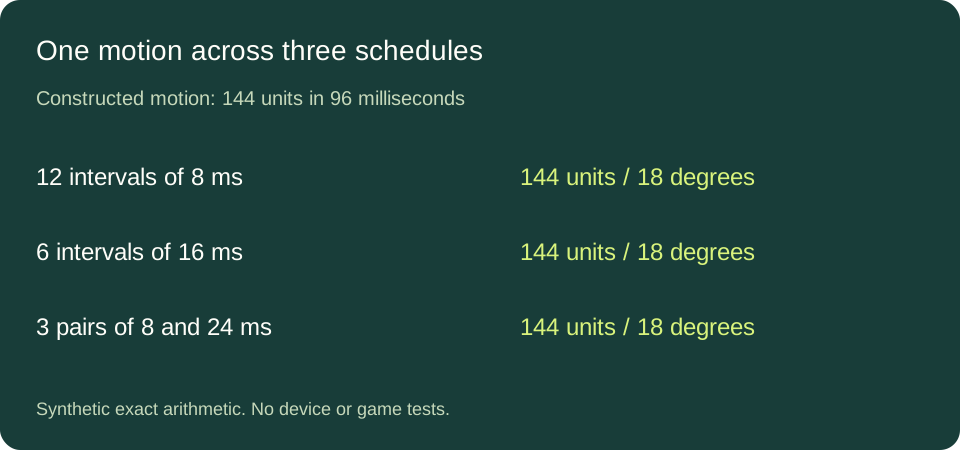
Construct a horizontal motion of 1,500 input units per second for 96 milliseconds. Pick a constant mapping of one eighth of a degree per unit. The total displacement is 144 units and the expected turn is 18 degrees. The units are deliberately generic; no real device or game trace was measured.
Split the same motion into twelve intervals of eight milliseconds. Each interval contains twelve units of displacement and contributes 1.5 degrees. Now split it into six intervals of sixteen milliseconds. Each interval contains twenty-four units and contributes three degrees. Both sums are eighteen degrees. A larger per-update displacement in the second schedule is expected because each update covers more time.
A multiplier calibrated at one update interval can hide the bug
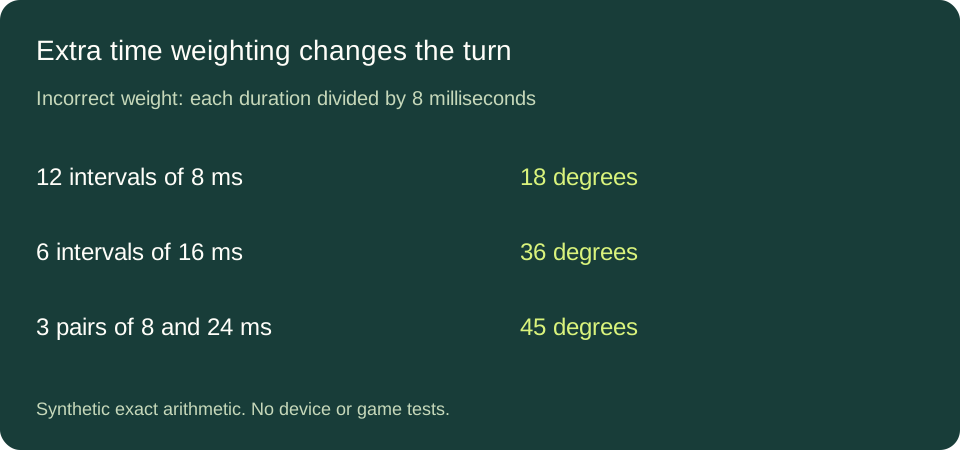
Construct an incorrect routine that multiplies each correctly calculated angle by the interval divided by eight milliseconds. This dimensionless normalization makes the extra multiplier one at the reference interval, so all twelve short updates still produce eighteen degrees. In the six longer updates the extra multiplier is two, producing thirty-six degrees. Tuning the gain on the short schedule would not reveal that dependence.
Next alternate eight and twenty-four milliseconds three times. Each pair covers thirty-two milliseconds and carries twelve plus thirty-six units. The correct response per pair is six degrees. With the extra multiplier the two terms are 1.5 × 1 and 4.5 × 3, which sum to fifteen degrees per pair. The wrong total is forty-five degrees, even though the motion still lasts ninety-six milliseconds and still carries 144 units. That example shows why equal elapsed time and equal total input do not rescue a duration-weighted displacement sum.
Velocity needs time; displacement does not
With the selected velocity of 1,500 units per second, multiplying by 0.008 seconds gives twelve units. Multiplying by 0.016 seconds gives twenty-four. The seconds cancel the per-second unit exactly once. If a recorded displacement already equals twelve units, multiplying it by 0.008 seconds instead produces units times seconds. A gain expressed in degrees per unit no longer yields just degrees. Normalizing the duration by a reference interval fixes the dimensions of the extra multiplier but still changes the behavior, as the constructed replay demonstrates.
For a rate estimate formed from a displacement divided by its own interval, multiplying by that same interval recovers the original displacement. Using a different interval is not that inverse operation. For example, divide twelve units by eight milliseconds to get the selected 1,500 units per second; integrate it over sixteen milliseconds and the result is twenty-four units, twice the displacement the source record represented.
Use the replay as a check on your own input code
- Write down whether each input value is a displacement, a rate or a normalized control value. Keep separate bindings separate until their units agree.
- Replay the same accumulated motion with different update boundaries. Check that each displacement is consumed once, then compare final accumulated angles.
- If results differ, inspect scaling, duplicate consumption and time factors separately. The example does not diagnose a particular game's input pipeline.
For a different timing question, see report frequency versus motion counts.
Direct answers
Does bigger displacement per frame mean sensitivity increased?
Not by itself. In the replay, longer intervals contain more displacement but the same total turn.
Should I remove time from a velocity input?
No. A velocity needs integration over the corresponding interval to produce displacement.
Does this tell me how to fix a commercial game?
No. It is a reproducible unit and accumulation check for a known input contract, not evidence about a closed game's code.
Sources and method
Godot InputEventMouseMotion documentation supplies the API distinctions. All durations, displacement values, gains and replay results here were independently selected and calculated.