MOUSE SENSITIVITY CONVERTER / PROJECTION GUIDE
Angle per mouse count is not a fixed number of pixels
An angular mouse step does not define a universal pixel step. In an ideal rectilinear view, projected movement also depends on horizontal field of view, viewport width and where the point starts. Keep degrees per count separate from projected coordinates; a subpixel coordinate change alone neither proves lost input nor diagnoses a game's rendering.
Published October 27, 2026 · AimConvert · an independent developer
Open the sensitivity converter ↗Separate rotation from the image it produces
A full-turn converter models a rotation relationship. Turning that angle into an image position requires a projection and a viewport. Microsoft's projection example uses the tangent of half the field of view; its transformation documentation separates projection from screen-space mapping. Those references supply geometric context, not certification of a particular game's input, camera or rendering behavior.
Build an explicit synthetic projection
Assume a centered rectilinear pinhole view with horizontal field of view H and viewport width W. Let theta be a point's horizontal bearing from the view center. Its projected horizontal offset from center is x = f × tan(theta), where f = W/[2 × tan(H/2)]. Use radians inside trigonometric functions. Here x is a continuous coordinate measured in viewport pixel units, not an integer column selected by a renderer.
For a deliberately chosen positive bearing change q, subtract the two projected positions: delta x = f × [tan(theta + q) − tan(theta)]. Both bearings must lie inside the assumed horizontal field of view. This construction isolates geometry. It does not assume a real camera turns in that sign direction, that an object remains visible during every motion, or that any engine uses this projection without additional processing.
One angular step, two starting positions
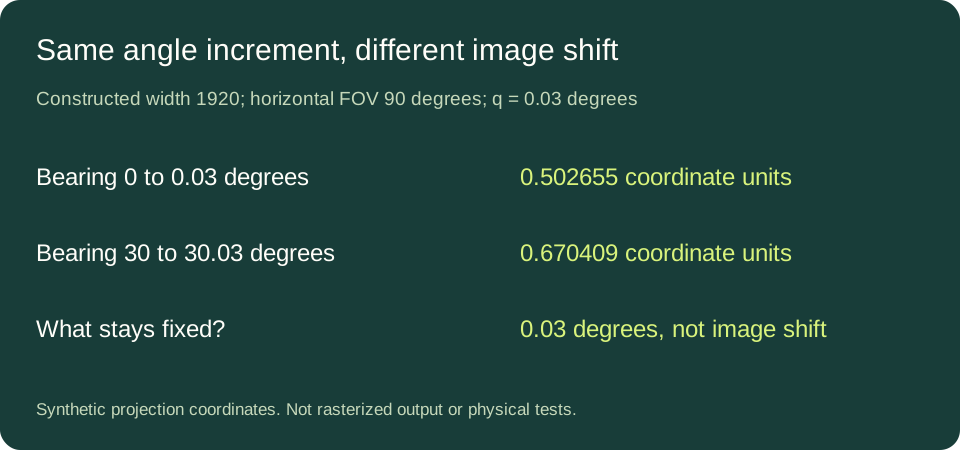
Choose synthetic inputs W = 1920, H = ninety degrees and q = 0.03 degrees. The focal scale f is 960. A point moving from bearing zero to 0.03 degrees changes projected position by approximately 0.502655 pixel-coordinate units. Starting at thirty degrees and ending at 30.03 degrees instead gives approximately 0.670409. The selected angular change is identical; the projected shifts differ.
The difference follows from the tangent mapping, not an invented sensor fault. This is also why dividing the whole horizontal field of view by screen width does not give a universally exact angle for every pixel position. Equal angular intervals need not occupy equal projected intervals. No display capture, mouse movement or game test was performed to produce these rows.
Change the viewport without changing the angle
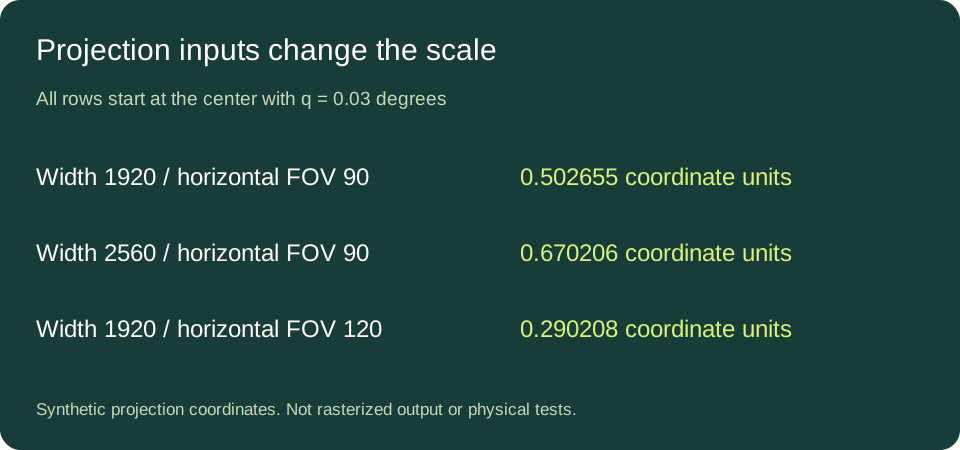
Keep the same ninety-degree horizontal field of view and central angular step, but choose W = 2560. The modeled shift becomes approximately 0.670206 coordinate units. It is exactly four thirds of the 1920-width result before decimal rounding because f scales linearly with W. That arithmetic changes the coordinate scale; it says nothing about the physical size of the monitor or a player's perceived speed.
Return to width 1920 and choose a horizontal field of view of 120 degrees. The same central 0.03-degree increment gives approximately 0.290208 coordinate units. These input combinations are constructed examples, not recommended settings. Horizontal field of view is specified explicitly: substituting a vertical or differently scaled menu value without conversion would describe a different geometry.
A one-unit threshold is local to the construction
At the center of the selected 1920-wide, ninety-degree view, set the projected offset to one coordinate unit. Solving 960 × tan(q) = 1 gives q = atan(1/960), approximately 0.059683 degrees. That is a local geometric threshold for this starting point and these projection inputs. It is not a universal sensitivity limit, a hardware minimum or an experimentally established cutoff for visible stutter.
At another bearing the equation involves a difference of tangents instead. At another width or field of view f changes. A single global “one count equals one pixel” target therefore discards information the model needs. Keep a numerical comparison's starting bearing and projection parameters alongside its result instead of treating a rounded ratio as a diagnosis.
What this calculation cannot tell you
A renderer may combine continuous coordinates, sampling, temporal history and output scaling. This guide neither models those operations nor claims their behavior in a named game. A projected coordinate increment smaller than one unit does not, by itself, mean the game discards it. A larger increment does not identify the cause of a reported jump. Timing, dropped events and actual camera response require separate observations.
Direct answers
Does matching cm/360 match every image displacement?
No such guarantee follows from a full-turn match. Projection inputs and the point's location remain separate.
Can I diagnose pixel skipping from these tables?
No. They are synthetic geometric counterexamples, not a test of an input device or rendering pipeline.
Where does count-space rotation fit?
It supplies a possible angular increment under an explicit response model. See counts per turn versus physical distance for that separate layer.
Sources and method
Microsoft's projection matrix example and Direct3D transformation pipeline describe projection and viewport stages. The finite differences, parameter comparisons and threshold inversion here were independently calculated with declared synthetic inputs. Values shown to six decimal places are rounded numerical outputs, not measurement precision.