MOUSE SENSITIVITY CONVERTER / FOV AXIS GUIDE
Convert horizontal and vertical FOV with an explicit aspect ratio
For a symmetric rectilinear view with active aspect ratio a = width/height, horizontal FOV H = 2 × atan[a × tan(V/2)]. Reverse it with V = 2 × atan[tan(H/2)/a]. Identify the angle's axis and the active viewport first; equal menu numbers alone do not establish equal views or sensitivity.
Published October 28, 2026 · AimConvert · an independent developer
Open the sensitivity converter ↗Identify what the FOV value describes
Horizontal and vertical field of view measure different angular spans. An unlabeled number cannot specify both. Microsoft's perspective API documents a vertical angle and an X:Y aspect ratio; Unity provides a separate vertical-to-horizontal conversion API. These references establish that axis and aspect are explicit inputs, not that any particular game menu follows one convention.
Derive the half-angle relation
Construct a centered rectangular image plane at a positive distance d from a pinhole. Call its half-width w and half-height h. Then tan(H/2) = w/d and tan(V/2) = h/d. Dividing the two expressions cancels d and leaves tan(H/2)/tan(V/2) = w/h. For the assumed square-pixel active viewport, w/h is its width divided by height, a. Rearranging gives the two formulas in the first answer.
This derivation uses half-angles because the centered plane extends on both sides of the view axis. It also explains why multiplying a full vertical angle directly by the aspect ratio is not the conversion. The tangent acts before the aspect multiplication, and the inverse tangent acts afterward. Convert degrees to radians for trigonometric functions and convert the final result back to degrees if needed.
Compare ninety horizontal with ninety vertical
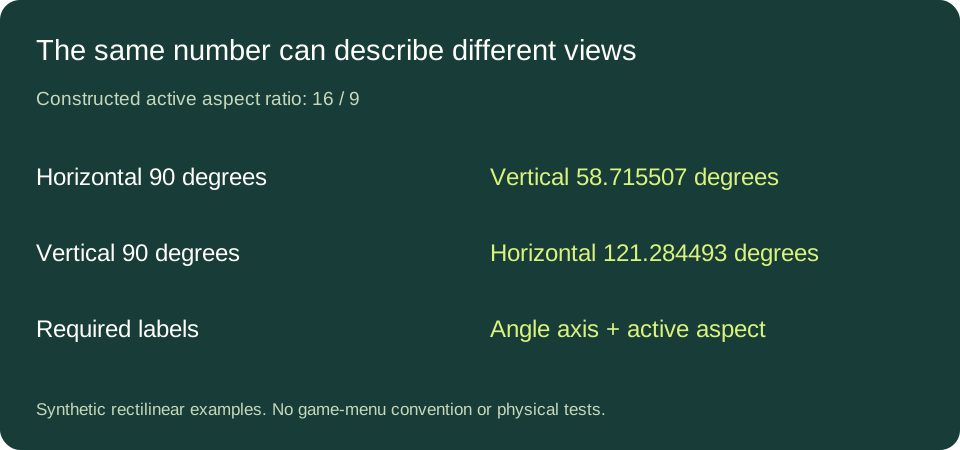
Choose a synthetic active aspect ratio of sixteen to nine. A horizontal span of ninety degrees converts to a vertical span of approximately 58.715507 degrees. A vertical span of ninety degrees instead converts to a horizontal span of approximately 121.284493 degrees. Both start with the written number ninety, but they describe different rectangles of angular coverage.
Substitute the first converted vertical value back into the horizontal formula using the same aspect. It returns ninety degrees within numerical precision before display rounding. That round trip checks the arithmetic and unit handling. It cannot verify an unidentified game slider, a mislabeled reference aspect or a camera configuration that differs from this construction.
State which angle stays fixed when aspect changes
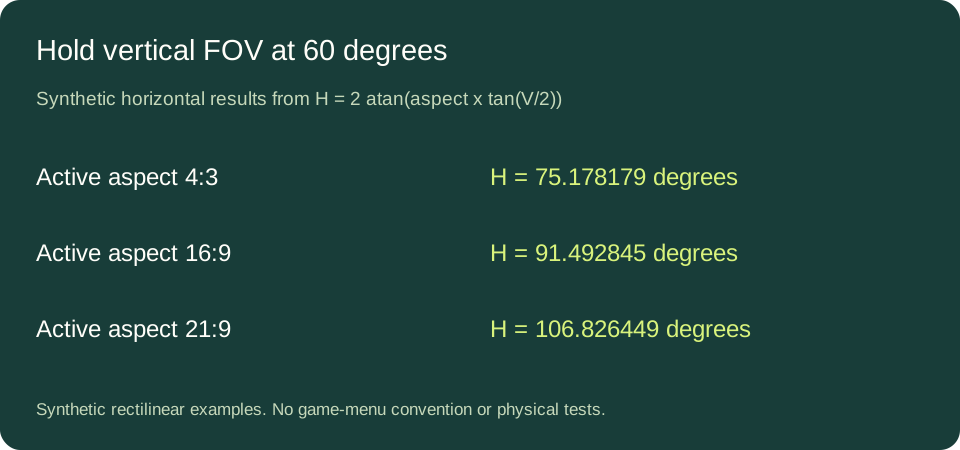
Hold the constructed vertical FOV at sixty degrees. At active aspect four to three, the horizontal result is approximately 75.178179 degrees. At sixteen to nine it is 91.492845; at twenty-one to nine it is 106.826449. The vertical span stays unchanged because that was the selected constraint. The horizontal span grows as the rectangle becomes wider.
Holding horizontal FOV fixed would answer another question: increasing aspect would reduce the converted vertical span. Neither behavior is automatically imposed on every game by the monitor shape. The formula converts a declared pair of geometric inputs; the application decides which camera properties it preserves. Record that policy separately rather than inferring it from an aspect ratio alone.
Use the active view, not an unrelated rectangle
Construct a 1920 by 1080 active viewport at vertical FOV sixty. Its horizontal span is the sixteen-to-nine result above. Now suppose the active view is only 1920 by 1440, displayed within a larger surface without changing its own projection. Its aspect is four to three, giving the smaller horizontal span in the table. Using the surrounding surface dimensions would calculate the wrong counterpart for the declared active view.
The example deliberately specifies square pixels and no additional stretch. A display stretch, a crop or a nonstandard projection needs its own description; silently substituting output dimensions does not resolve those cases. Equal aspect ratios at different resolutions do give identical H-to-V conversions in this model because only their ratio appears. A square active viewport gives H = V, a useful independent sanity check.
Keep FOV conversion separate from sensitivity conversion
These equations relate angular coverage, not mouse travel. They do not supply a game's response coefficient, scoped multiplier or input behavior. Record the actual FOV convention before comparing views; then treat any rotation-distance match as a separate calculation. For the next image-mapping layer see angle per count versus projected pixels.
Direct answers
Can I copy a FOV number between two games?
Only after identifying each convention and active aspect; the number alone is insufficient. This guide verifies no current game-menu convention.
Does a resolution change always change the converted FOV?
No. In this model equal active aspect ratios produce equal axis conversions, regardless of absolute width and height.
Is FOV conversion a guarantee of matching aim feel?
No. It describes one geometric relationship and does not establish input response or a player's experience.
Sources and method
Microsoft perspective API and Unity's axis-conversion API provide parameter context. The image-plane derivation, synthetic examples, round trips and diagrams here were independently calculated. Decimal results are rounded to six places, not measured precision or optimal settings.